Premium Plans

5,000+ Free Video Editing Assets: VFX, Transitions, Overlays & Music
5,000+ Free Video Editing Assets: VFX, Transitions, Overlays & Music
Learn how to create authentic muzzle flash effects for action films. Understand firearm flash signatures, compositing techniques, and find specialized weapon effect bundles from 5000+ asset libraries.
Muzzle flash VFX is the difference between "looks like Hollywood" and "looks like a real gunshot." An inaccurate muzzle flash—wrong intensity, wrong color, wrong timing relative to sound—instantly breaks the illusion of gunfire.
This guide covers the complete muzzle flash workflow for action filmmakers: from practical on-set flash choices through digital enhancement, compositing techniques, and where to source professional muzzle flash bundles for postproduction authenticity.
Muzzle flash appears in:
The paradox of good VFX: When muzzle flash is done perfectly, audiences don't notice it. They just accept the gunshot as real.
Bad muzzle flash problems:
Professional standard: Muzzle flash should look so real that audiences never think "that's VFX." They just see a gunshot.
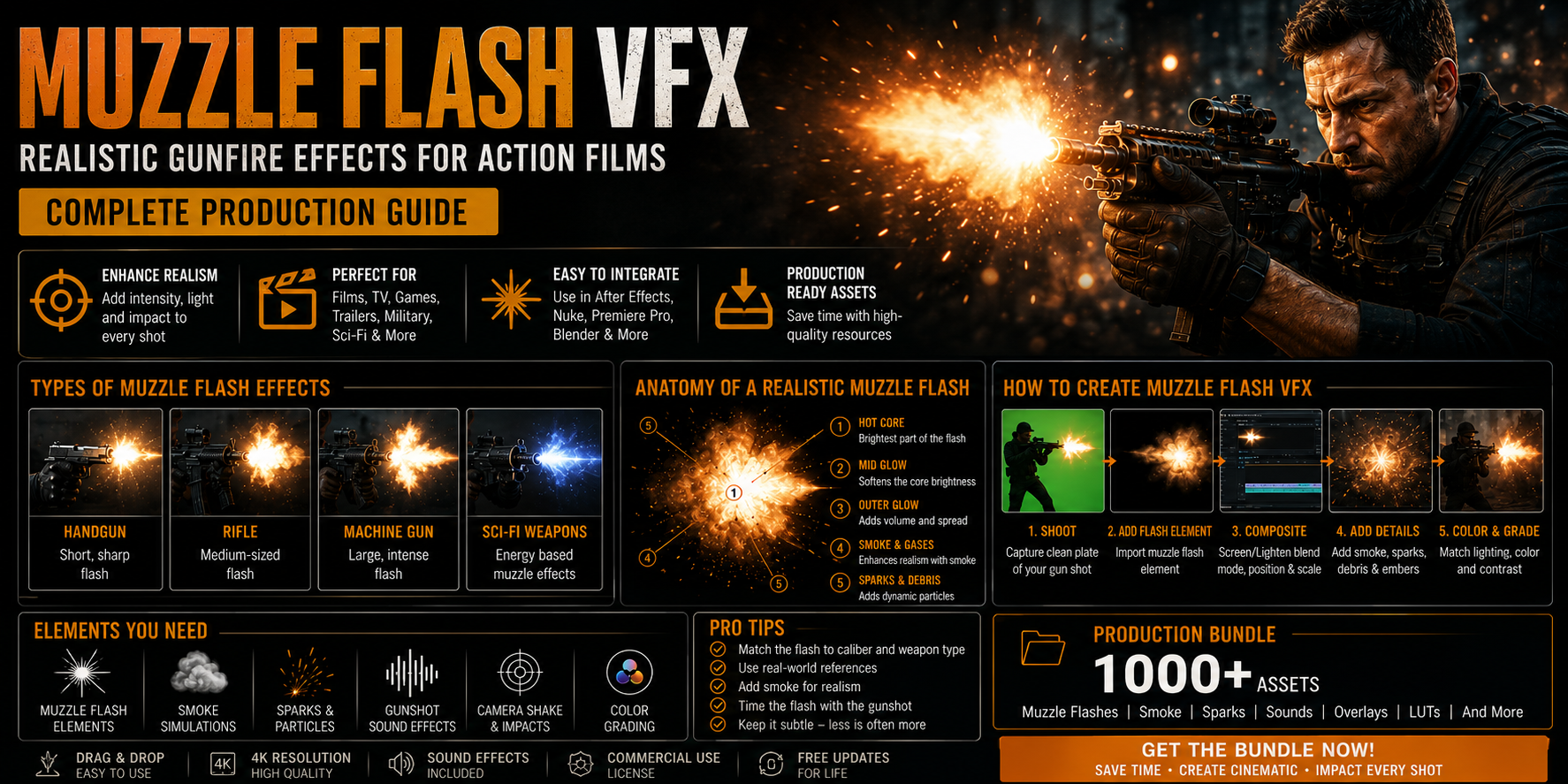
Muzzle flash isn't just one element. It's:
Each component affects realism differently.
Different firearms produce distinctly different muzzle flashes. Professional productions get this right.
Characteristics:
Why it matters: Handgun scenes (duels, urban gunfights) look wrong with rifle-scale flash.
Common error: Using large flash for small handgun (makes gun look more powerful than reality).
Characteristics:
Why it matters: War films and tactical sequences require accurate rifle flash (larger than handguns).
Professional note: Suppressed rifles have much less flash (dim glow, no bright flame).
Characteristics:
Why it matters: Shotgun flash is distinctive. Shotgun in film requires different effect than rifle.
Characteristics:
Why it matters: Full-auto gunfire has distinctive rhythm. Machine gun bursts look different from single shots.
Characteristics:
Why it matters: Silenced weapons should look different from unsuppressed (suppression works). Many indie films miss this—silenced guns still show bright flash (unrealistic).
Characteristics:
Why it matters: Military films using tracer rounds have distinctive visual signature different from standard ammo.
Platforms with comprehensive VFX libraries organize muzzle flash effects into:
What they include: Small to medium muzzle flashes appropriate for pistols, revolvers, SMGs.
Variations:
File format: MOV with alpha channel (transparent background)
Resolution: Typically 1080p-4K
Bundle size: 15-25 handgun flash variations
Best for: Crime thrillers, urban gunfights, intimate confrontations
Professional detail: Handgun flash is often underestimated in films. Real handguns produce visible flash but less dramatic than rifles. Many indie films show too-bright handgun flash.
What they include: Large, dramatic muzzle flashes appropriate for military/war films.
Variations:
Resolution: 4K minimum (detail-heavy, higher resolution needed)
Bundle size: 20-30 rifle flash variations
Best for: War films, military action, tactical sequences
Professional detail: Rifle flashes are larger and more complex. They're the "showcase" muzzle flash that demands attention.
What they include: Wide, dispersed flashes from shotguns.
Variations:
Bundle size: 10-15 shotgun variations
Best for: Westerns, crime films, close-quarters combat
Professional detail: Shotgun flashes are shorter duration than rifles but wider dispersal. The distinctive character of shotguns should be visible in muzzle flash.
What they include: Rapid-fire muzzle flashes showing strobe-light effect of full-auto fire.
Variations:
Why distinct: Full-auto fire is visually rhythmic—the flash pattern is diagnostic of weapon type. Professionals can identify weapons by muzzle flash pattern alone.
Bundle size: 15-25 variations (rhythm and pattern variation)
Best for: War films, military action, high-intensity shootouts
Professional detail: Machine gun fire doesn't look like rapid handgun fire. The staccato pattern is distinctive and critical for realism.
What they include: Minimal muzzle flash effects for suppressed weapons.
Variations:
Why important: Suppressors work in real life. Suppressed weapons don't produce the dramatic flash of unsuppressed weapons. Showing bright muzzle flash on suppressed weapon is unrealistic.
Bundle size: 8-12 subtle variations
Best for: Tactical/special forces content, realistic modern warfare
Professional detail: This is where film realism diverges from audience expectations. Audiences expect bright muzzle flash, so suppressed weapons look "weak" unless you're educating viewers about actual suppression.
What they include: Non-realistic, stylized muzzle flashes for sci-fi, fantasy, and superhero weapons.
Variations:
Why separate: Sci-fi weapons shouldn't look like real firearms. Different aesthetic entirely.
Bundle size: 15-20 variations per sci-fi style
Best for: Sci-fi, superhero, fantasy action
Before adding muzzle flash, determine:
Match shot to weapon-specific bundles:
Close-up of handgun: Use handgun flash pack, medium intensity Wide shot, rifle fire: Use rifle flash pack, dramatic intensity Full-auto burst sequence: Use machine gun flash pack with rapid rhythm Suppressed pistol: Use tactical/suppressed flash pack, minimal visibility
Critical: Using rifle flash for handgun = obviously wrong to anyone familiar with firearms.
In After Effects:
Timing is critical: Muzzle flash appears ~1-2 frames before gunshot sound (light vs. sound speed). Get this right.
Critical for realism:
Scale: Flash should match weapon size
Intensity: Should match lighting environment
Oversized or too-bright flash looks artificial. Undersized or dim flash looks weak.
Match flash color to:
Use curves/color correction to integrate flash with scene lighting.
Professional muzzle flash includes:
Layering multiple effects (base flash + smoke + light effect) creates realism.
Gunshot sound must align with muzzle flash:
If muzzle flash and gunshot audio don't align, the shot feels fake.
Different firearms have distinctly different flashes:
Wrong weapon flash = immediately obvious to firearms-familiar viewers.
Flash visibility changes dramatically based on scene lighting:
Match flash intensity to environment.
Muzzle flash must sync with gunshot audio:
Test on good speakers/monitors to verify alignment.
In multi-shot sequences, vary:
Identical flash every shot signals "copied effect," not realism.
Common amateur mistake: Flash so bright it overwhelms scene.
Actually, even dramatic rifle flashes should:
Bright doesn't mean better. Professional flash is bright and integrated.
Each weapon type needs appropriate flash:
Different weapons = different flash bundles.
Flash-only effect looks incomplete:
Professional composites layer base flash + secondary smoke.
Flash isn't just visible in barrel area. It provides light:
Good composites add lighting layer showing flash illuminating surroundings.
Approach: Authentic, weapon-specific, sustained
Bundle strategy:
Philosophy: Realism is paramount. Firearms enthusiasts will scrutinize accuracy.
Time investment: High (sustained firefight sequences, many shots requiring individual flash compositing)
Approach: Dramatic, impactful, cinematic
Bundle strategy:
Philosophy: Balance realism with cinematic impact. Audiences expect drama.
Time investment: Medium (gunfights but not sustained battles)
Approach: Realistic but not documentary-style
Bundle strategy:
Philosophy: Realism should match show's tone. CSI-style shows use realistic flash.
Time investment: Low-medium (individual gunshots, not extended sequences)
Approach: Stylized realism, period-appropriate
Bundle strategy:
Philosophy: Period authenticity meets cinematic drama.
Time investment: High (gunfights and duels are centerpiece)
Approach: Stylized, non-realistic, visually distinctive
Bundle strategy:
Philosophy: Weapon flash design is part of world-building. Not beholden to real-world physics.
Time investment: High (complex effects, custom looks)
Muzzle flash and gunshot audio are inseparable:
Gunshot sound characteristics:
Sound synchronization:
Pro tip: Edit muzzle flash first, then sound design around the visual. Flash is visible light—it's deterministic. Sound timing should follow, not lead.
Professional gunshot combines:
Each element must coordinate for total realism.
Problem: Using rifle flash for handgun, or vice versa.
Solution: Know your firearms or consult reference. Different weapons = different flashes.
Problem: Flash and gunshot audio don't align.
Solution: Flash appears before sound. Sync carefully. Test on different audio systems.
Problem: Flash is so bright it overwhelms scene, makes gunshot look artificial.
Solution: Flash should be visible and dramatic without washing out surroundings. Test on different monitors.
Problem: Same gunshot effect copy-pasted throughout sequence (obviously repeated).
Solution: Download bundle with variations. Randomize intensity, position, secondary effects.
Problem: Flash-only effect looks incomplete, missing lingering smoke.
Solution: Layer smoke effects lingering after flash fades. Professional flash has multiple layers.
Problem: Flash is visible in barrel but doesn't illuminate surroundings.
Solution: Add lighting layer showing flash providing illumination. Subtle but critical.
Problem: Suppressed weapon shows bright flash (suppressors eliminate flash).
Solution: Suppress weapons should show minimal/no flash. Different effect entirely.
Some productions use practical muzzle flash (flash pots, practical pyrotechnics):
Most modern productions skip practical flash and add digital entirely.
Free Approach:
Cost: $0 + 40-80 hours labor per sequence
Budget Approach:
Cost: $50-100 bundles + 20-40 hours labor
Professional Approach:
Cost: $100-300 bundles + 10-20 hours labor
Hire VFX Artist:
Cost: $2500-7500 per extended gunfight
Muzzle flash is often the invisible detail that makes viewers subconsciously accept gunfire as real. When done wrong, it's immediately obvious. When done right, it disappears into the action.
Professional approach:
Modern muzzle flash bundles from 5000+ asset libraries give you everything you need to produce professional-quality gunfire effects. The key is understanding firearms fundamentals and spending time on compositing details.
Professional muzzle flash looks so good that audiences never think "that's VFX." They just see authentic gunfire.
Next step: Research the primary weapon type in your film (handgun, rifle, shotgun, etc.), download the corresponding muzzle flash bundle, test on a single gunshot, then scale across your full sequence.